Overview
Canon imagePROGRAF announces yet another breakthrough in large format printing
solutions. With the imagePROGRAF iPF8100 printer, brilliant color, sophisticated
print-head technology, and high speed output are brought together into a high-performance
large format printing-system. With features designed to help all levels of
users achieve extraordinary results, the iPF8100 printer is the ideal solution
for any color professional looking for striking, full-bleed color output with
strength in paper handling and exceptional speed in output. The iPF8100 printer
is engineered to produce colors, fine details, and subtle expressions required
for some of the most challenging color environments such as photography, proofing
and professional graphic applications.
The new iPF8100 printer is equipped with the ability to recalibrate itself
to the original factory settings and apply any necessary adjustments across
the printer media types. The result, a more predictable printing platform where
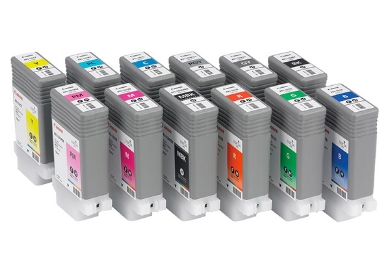
results can be consistently achieved. The 12-color pigment ink system with
LUCIA inks offers excellent color fastness and stability with a remarkably
wide color gamut. The new ink formulation for Black, Matte Black, Gray and
Photo Gray minimizes bronzing, while providing stronger ink adhesion to the
print media, resulting in better scratch resistance without any additional
protection. The Canon L-COA processor, which is dedicated to the imagePROGRAF,
is designed to optimize the best quality output at the highest possible speeds.
Vivid breathtaking, long lasting prints are achieved by combining Canonfts advanced
technological achievements. The iPF8100 is designed for reliability, simplicity,
productivity and above all quality.
Features and Benefits
12-Color Pigment Ink System - LUCIA inks The iPF8100 printer’s ink set
is comprised of 12 colors: four standard process colors with Photo Cyan and
Photo Magenta; plus Red, Green, and Blue; Matte Black, Gray, and Photo Gray.
This unique combination creates a broad color pallet and delivers exceptional
print results. The iPF8100 printer’s LUCIA ink is specially formulated
to reduce graininess, minimize bronzing, and resist scratching and fading.
Black, Matte Black, Gray and Photo Gray have been reformulated to optimize
black ink density for exceptional monochrome photo-quality output. Based on
the type of ink being used, the iPF8100 printer automatically matches the correct
black ink to achieve the best print results.
Built-in Calibration The iPF8100 printer is equipped with the ability to recalibrate
itself to the original optimal factory settings and apply any necessary adjustments
across the printer media types. At the same times this creates a more stable,
predictable printing platform on which superior results can be consistently
achieved. The system has built-in calibration sensors that accurately detect
variation in print heads and measures the density levels of the inks and makes
necessary adjustments to return calibration to the original factory settings.
Automatic Switching of Black Inks The iPF8100 will automatically switch between
Black and Matte Black at the time of printing. Simply choose the paper type
and the iPF8100 will use the appropriate black to optimize print quality. The
Black ink produces high quality prints on photo glossy type media and the Matte
Black ink exhibits high contrast prints with deep black on media such as fine
art paper.
Print Head - PF-03 - Dual print head system Engineered for speed and advanced
image production, the iPF8100 boasts Canonfts dual print head system to lay
down ink with unprecedented speed and accuracy. Unlike conventional printers
with a single print head, the iPF8100 uses two high-precision, high density
print heads with a total of 30,720 nozzles. It lays down precise 4pl ink droplets
to produce sharp detail and excellent image quality.
The superfine 4pl droplets produce delicate color gradations and high-definition.
The twin lines of nozzles on the new print heads enable the iPF8100 to minimize
the number of printing passes and still maintain print quality. The two 1-inch
iPF series print heads, each with 6 colors with 2,560 nozzles per color. That’s
a total of 30,720 nozzles. More nozzles mean more ink is ejected with every
pass of the print head, no matter what print mode or media. It gives new meaning
to “high-speed output”.
L-COA Controller - Print Controller Like other powerful Canon systems, the
iPF8100 is built around the innovative L-COA (Large Format printer COmmon Architecture)
processor. When it comes to speed and accuracy, the L-COA processor is in a
league of its own. By intelligently processing print data and directing the
high precision, high-density print heads to deposit ink, the system ensures
image clarity and color accuracy – even for complex graphics and color-rich
photographic images. Combined with Canonfts dual print head design and the most
ink nozzles per color in the industry, the L-COA controller helps achieve phenomenal
print speeds.
Print Plug-in for Adobe® Photoshop® and Digital Photo Professional
- An export print module These export modules allow users to directly process
and print RAW image files from DPP or Adobe Photoshop. These plug-ins are export
modules that bypass the operating systems dependent print driver, allowing
processing of 16-bit RGB images directly, which dramatically increases gradations
and as a result, overall image quality.
New added features
• Full screen preview
• More print quality selections
• Categorized paper type view
• Roll paper layout view
• Bi-cubic enlargement
Printer Driver 2007 The imagePROGRAF printer driver works with both Windows® and
Macintosh® operating systems offering exceptional, high quality prints
through easy usability and accurate color. The printer driver incorporates
existing imagePROGRAF features along with new, easy to use functions. The monochrome
photo mode produces neutral, high quality monochrome images with the primary
use of the Black, Gray and Photo Gray inks. This mode helps to ensure minimal
shifts in color that are commonly caused by the use of color inks in black
and white prints, thus outputting neutral tones with smooth gradation. Another
easy to use feature is the free layout feature1, which allows for custom nesting
of separate images and documents.
Features
• Web links (Support tab) – An html-based utility that provides
access to websites through the printer driver
• Categorized Media list – Media names are organized in a hierarchical
tree structure
• More detailed page preview – provides a more clearer and more
intuitive preview
• Scan to Copy - imageRUNNER enlargement copy
• 14 preset document profiles (examples are Poster, CAD, Photo)
• Automatic print quality options dependent on print application and
media
• Borderless printing
• Saturation Adjustment
• Easy Setting/Advanced Setting/Print Setting
• Monochrome photo mode
• Support for Adobe RGB
• Free layout feature1
1Windows Only
Digital Photo Front-Access The Digital Photo Front-Access has been developed
by Canon as a utility to import images from a camera, memory card, USB, etc
and incorporate them into software applications such as PosterArtist and Photoshop.
• Auto image retouching
• Ability to open in PosterArtist and Photoshop
• Support for JPEG and RAW images
• Simple configuration of print settings by means of the printer driver
PosterArtist (Optional Software) –Poster creation software This template
driven software was developed by Canon specifically to create large-format
posters with complete ease. PosterArtist helps users of all levels to create
professional looking posters, banners and signage in 4 easy steps. This application
offers a variety of templates, hi-res royalty-free images and clipart designed
to target a wide array of markets such as food service, education, offices,
retail and much more. PosterArtist 2007 allows users to use Kyuanos advanced
color management system, providing a smart and simple way of managing colors
under any viewing conditions. Also included in PosterArtist 2007 is the Auto
Design feature in which the users can simply designate a few images to be in
incorporated in a poster, and PosterArtist will automatically create professional – looking
posters for immediate use. Also, the template filtering feature allows users
to find and apply a template quickly and easily from hundreds of templates
in the library.
Feature
• Provides professionally designed templates to simplify poster creation
• Over 1GB of preloaded files in a wide variety of poster designs and
artwork
• Variable Data Printing
• Page Capture feature allows users to load desired data from other
applications into a PosterArtist poster, such as Microsoft®, Word®,
Excel® and Adobe® Acrobat®
• Import images directly from most digital cameras
PosterArtist QuickCopy - separate application with the ability to enlarge
image data scanned with any CanoScan flat bed scanner.
Clogged Nozzle Detection and Compensation The printer will automatically perform
the necessary cleaning without any intervention from the user. If the nozzle
remains obstruccted, the imagePROGRAF will reroute the ink to other functioning
nozzles to compensate for the clog.
Media Roll Detection System The imagePROGRAF is capable of tracking how much
paper is remaining on the roll, preventing print jobs from being ruined. It
prints the media information (in text and barcode) directly on the roll, before
it is removed from the printer.
Borderless Printing The printer is capable of producing 4-sided, borderless
prints in minutes. This edge-to-edge printing ability eliminates the need for
cutting and is just one example of the efficiency and innovation built into
the Canon solution.